


Barcoding for Dummies: A Simple Guide to How Barcodes Work

Barcodes are everywhere.
They are on the products you buy, the packages delivered to your house, the labels inside warehouses, the wristbands used in hospitals, the tickets you scan at events, and the inventory tags used by almost every business.
Most people see barcodes every day, but not everyone understands what they actually do.
The good news is that barcoding is not complicated once you break it down. At its most basic level, a barcode is just a way to store information in a pattern that a scanner can read quickly.
What Is a Barcode?
A barcode is a visual code that represents data.
That data could be a product number, serial number, tracking number, patient ID, part number, price, location, expiration date, or almost anything else a business wants to identify.
The barcode itself does not usually contain every detail about the item. Instead, it often contains a number or code that connects to information in a system.
For example, when you scan a barcode on a box, the barcode may not contain the full product description, price, shipping address, and inventory history. It may simply contain an item number. The computer system then looks up that item number and displays the correct information.
Think of a barcode like a license plate.
The license plate does not tell you everything about the car. But when that plate is looked up in a system, it can connect to the vehicle’s information.
Why Do Companies Use Barcodes?
Companies use barcodes because they are faster and more accurate than typing information by hand.
Imagine a warehouse employee manually typing a 20-digit tracking number every time a package moves. Mistakes would happen constantly. Numbers would be missed, shipments would be delayed, and inventory would become inaccurate.
With a barcode, that same number can be scanned in less than a second.
Barcodes help companies:
Track inventorySpeed up shipping and receivingReduce human errorIdentify productsImprove checkout speedTrack assets and equipmentManage expiration datesSupport compliance and recallsConnect physical items to digital systems
In simple terms, barcodes help businesses know what something is, where it is, and what should happen next.
How Does a Barcode Work?
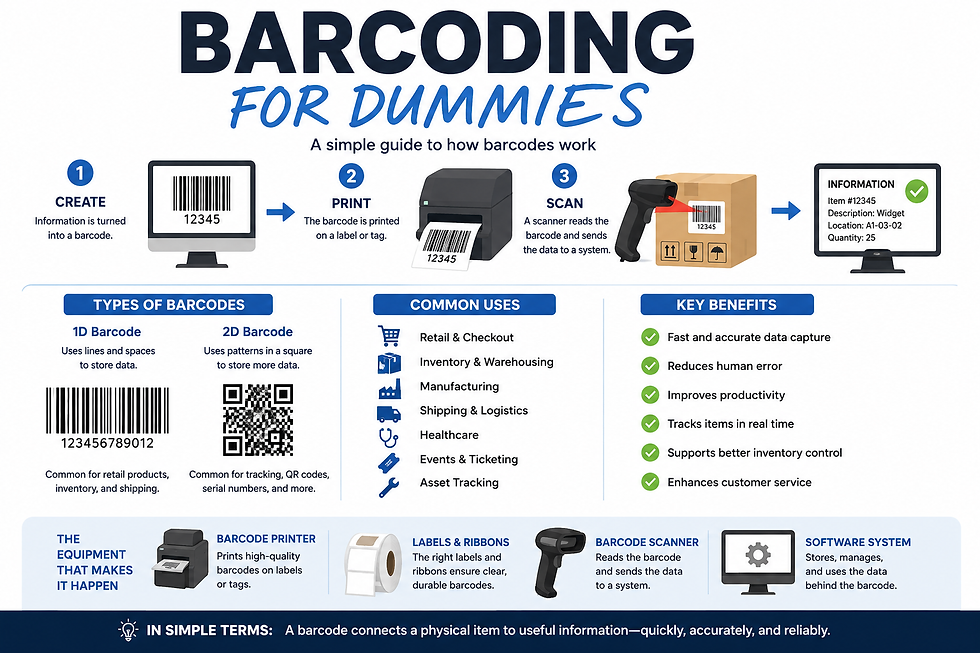
A barcode works in three basic steps.
First, information is turned into a barcode. This is usually done by software.
Second, the barcode is printed on a label, package, tag, receipt, wristband, or product.
Third, a scanner reads the barcode and sends the information to a computer system.
The scanner is not “seeing” the product the way a person does. It is reading the pattern of lines, spaces, squares, or dots and converting that pattern back into data.
That data is then used by a point-of-sale system, warehouse management system, shipping system, inventory system, healthcare system, or other business software.
The Two Main Types of Barcodes
There are many barcode types, but most fall into two main categories: 1D barcodes and 2D barcodes.
1D Barcodes
A 1D barcode is the classic barcode most people recognize. It uses vertical black lines and white spaces.
These are common on retail products, shipping labels, inventory labels, and warehouse labels.
A 1D barcode usually stores a smaller amount of data, such as a product number, item number, or tracking number.
Examples include UPC codes, Code 39, Code 128, and EAN codes.
A UPC barcode on a grocery item is a common example. When the cashier scans it, the store system identifies the product and price.
2D Barcodes
A 2D barcode stores information in a square or rectangular pattern. Instead of just using lines, it uses dots, squares, and shapes.
The most common 2D barcode is a QR code.
2D barcodes can hold more information than 1D barcodes. They can store website links, serial numbers, batch numbers, expiration dates, product details, or multiple pieces of data in one code.
Examples include QR codes, Data Matrix codes, and PDF417 codes.
You often see 2D barcodes on electronics, medical devices, event tickets, shipping labels, and product packaging.
What Is the Difference Between a Barcode and a QR Code?
A QR code is a type of barcode.
The word “barcode” is the broad category. A QR code is one specific kind of 2D barcode.
A traditional barcode is usually read left to right. A QR code can store more data because it uses a two-dimensional square pattern.
Simple way to remember it:
A regular barcode is like a short sentence.
A QR code is like a small paragraph.
What Information Can a Barcode Hold?
A barcode can hold many different types of information, depending on the barcode format and the system behind it.
Common examples include:
Product number
SKU number
Serial number
Lot number
Expiration date
Tracking number
Patient ID
Employee ID
Location code
Price lookup number
Website link
Order number
In business applications, the barcode usually points back to a database. That database holds the deeper information.
The barcode is simply the fast way to access it.
What Is a Barcode Scanner?
A barcode scanner is a device that reads the barcode and sends the data to a computer, tablet, register, or mobile device.
Some scanners are handheld. Some are built into checkout counters. Some are mounted on conveyor lines. Some are built into mobile computers.
There are different scanner types depending on the application.
A retail store may use a simple handheld scanner.
A warehouse may use a rugged mobile computer with a built-in scanner.
A manufacturing line may use a fixed scanner that reads barcodes automatically as products move by.
What Is a Barcode Printer?
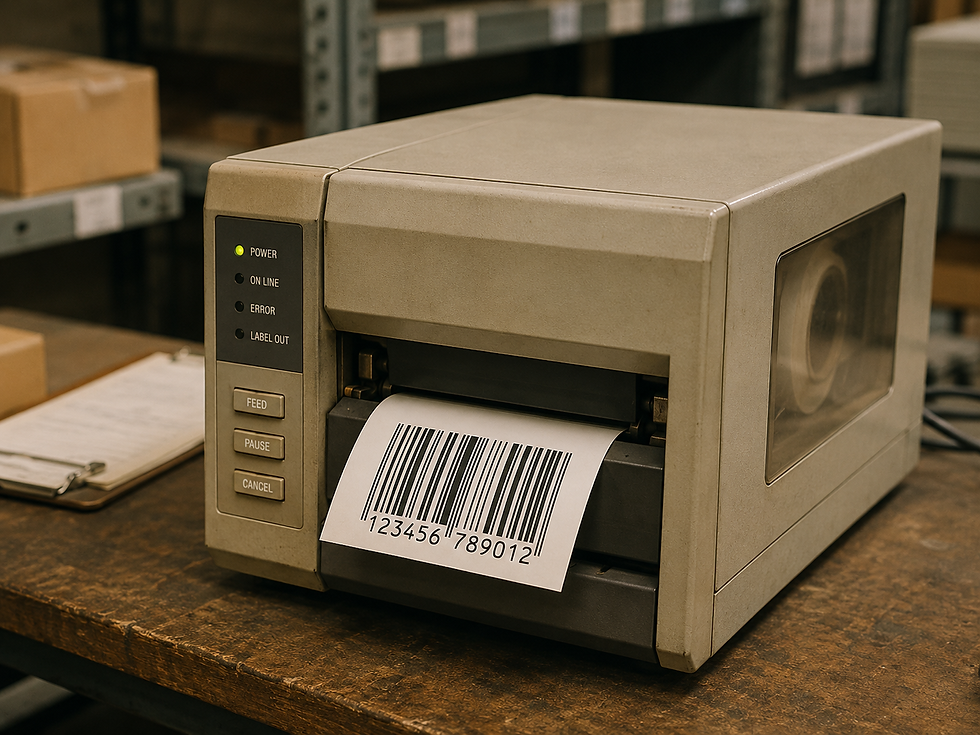
A barcode printer prints the labels or tags that carry the barcode.
Most barcode labels are printed using thermal printing technology. That means the printer uses heat instead of inkjet or toner.
There are two common types of thermal printing:
Direct thermal uses heat-sensitive labels and does not require a ribbon.
Thermal transfer uses a ribbon to transfer ink onto the label.
Direct thermal is often used for short-term labels like shipping labels and receipts. Thermal transfer is often used for longer-lasting labels like product labels, asset tags, compliance labels, and warehouse labels.
Why Barcode Quality Matters
Not all barcodes are created equal.
A barcode must be printed clearly enough for a scanner to read it. If the bars are blurry, too light, too dark, too small, damaged, or printed on the wrong material, the scanner may fail.
When a barcode does not scan, people usually blame the scanner. But many scanning problems start with the label.
Common barcode problems include:
Poor print quality
Low contrast between the barcode and background
Wrinkled ribbon
Dirty printhead
Wrong label material
Barcode too small
Barcode placed on a curved or damaged surface
Label exposed to heat, chemicals, sunlight, or moisture
A good barcode system depends on the right printer, label, ribbon, software, scanner, and placement.
What Does “Scan Rate” Mean?
Scan rate refers to how easily and consistently a barcode can be scanned.
A good barcode should scan the first time.
A poor barcode may require multiple attempts, a closer angle, or manual entry.
In a busy warehouse, even a few seconds per scan can add up quickly. If workers scan thousands of labels per day, poor barcode quality can cost time, money, and productivity.
What Is a SKU?
SKU stands for Stock Keeping Unit.
A SKU is an internal product number used by a business to identify an item.
For example, a shoe store may have a different SKU for each shoe style, size, and color.
A barcode may contain the SKU, or it may contain another number that connects to the SKU in the company’s system.
Simple example:
A red shirt, size large, may have one SKU.A red shirt, size medium, may have another SKU.A blue shirt, size large, may have a different SKU.
The barcode helps the system know exactly which item is being scanned.
What Is a UPC?
UPC stands for Universal Product Code.
This is the barcode commonly found on retail products. It helps stores identify products at checkout.
The UPC is usually managed according to industry standards so the same product can be recognized across different retailers.
If you buy a bottle of water at a grocery store, the UPC tells the register which product it is.
What Is a Lot Number?
A lot number identifies a group of products made together.
This is important for food, pharmaceuticals, medical products, chemicals, and manufacturing.
If there is a recall, lot numbers help companies identify exactly which products are affected.
For example, if a food product has a quality issue, the company does not want to recall every product it ever made. It wants to find the specific batch.
Barcodes make that much easier.
What Is a Serial Number?
A serial number identifies one specific item.
A lot number identifies a group. A serial number identifies an individual unit.
For example, every laptop may have its own serial number. That number can be used for warranty, repair, tracking, or ownership records.
A barcode can make it faster to scan and record that serial number.
Where Are Barcodes Used?
Barcodes are used almost everywhere.
In retail, they are used for checkout, pricing, inventory, returns, and product tracking.
In warehouses, they are used for receiving, picking, packing, shipping, and inventory control.
In manufacturing, they are used for parts tracking, work-in-process tracking, quality control, and finished goods labeling.
In healthcare, they are used for patient wristbands, medication tracking, lab samples, and medical devices.
In transportation and logistics, they are used for package tracking, route sorting, proof of delivery, and shipping labels.
In food service, they are used for expiration dates, prep labels, ingredient tracking, and order accuracy.
What Makes a Good Barcode System?
A good barcode system is not just about the barcode. It is about how everything works together.
A strong barcode system includes:
The right label material
The right printer
The right ribbon, if needed
The right scanner
The right barcode type
Good label design
Correct barcode size
Clean print quality
Good placement on the product or package
Software that connects the barcode to useful information
The best barcode system is one that workers can use quickly, accurately, and consistently.
Common Barcode Mistakes
One of the biggest mistakes companies make is treating barcode labels as an afterthought.
They may buy the cheapest labels, use the wrong ribbon, print too small, or place the barcode where it gets damaged.
Another common mistake is not thinking about the environment.
A label used inside an office does not need the same durability as a label used in a freezer, warehouse, outdoor yard, or manufacturing plant.
Before choosing a barcode label, ask:
Will it be exposed to heat?
Will it be exposed to cold?
Will it get wet?
Will it be touched often?
Will it be exposed to chemicals?
How long does it need to last?
Does it need to scan from far away?
Will it be placed on cardboard, plastic, metal, glass, or fabric?
The answers matter.
Barcoding Is Really About Visibility
At the end of the day, barcoding is about visibility.
A barcode helps a company connect a physical item to digital information.
Without barcodes, businesses rely heavily on manual entry, handwritten notes, memory, and guesswork.
With barcodes, businesses can track products, materials, orders, assets, and people more accurately.
That visibility helps companies reduce mistakes, move faster, and make better decisions.
Final Thoughts
Barcodes may look simple, but they play a huge role in how modern business works.
They help stores check out customers, warehouses ship orders, hospitals protect patients, manufacturers track parts, and delivery companies move packages around the world.
The basic idea is easy to understand:
A barcode is a machine-readable code that identifies something.
A scanner reads it.
A system uses it.
A printer creates it.
When done correctly, barcoding saves time, reduces mistakes, and gives businesses better control over their operations.
You do not need to be a technology expert to understand barcoding. You just need to remember this:
Barcodes are the bridge between the physical world and the digital system behind it.


Comments